
On this page
Key takeaways
A phone can run your counter well, as long as the basics are right:
- One account for phone and computer, so records never split.
- Stock that moves with every bill and purchase.
- Tax worked out on each line, not added by hand.
- Khata updated the moment a bill is left unpaid.
- Bills you can share on WhatsApp in one tap.
- A five-minute check at closing time.
For many shop owners the phone is already the busiest tool in the shop. Supplier orders come on WhatsApp, payments arrive on UPI, and customers call to ask what they owe. Yet bills are often still written in a book, stock is counted from memory, and the khata lives in a separate register.
Moving billing to the phone is not about having an app for its own sake. It is about doing each job once: one bill that also reduces stock, works out the tax and, when the customer pays later, adds the right amount to their khata.
This guide explains what a phone-based setup should do, a simple daily routine, and the mistakes to avoid.
01 Why Billing on the Phone Makes Sense
A counter computer is not practical for every shop. A phone is always with you, works in a small space and can scan barcodes with its camera. For a kirana store, a medical shop, a hardware counter or a wholesaler visiting customers, it is often the only device that is always at hand.
- Speed at the counter — search or scan an item, adjust the quantity and save.
- Bills on WhatsApp — customers get a bill they can keep instead of a slip that gets lost.
- Khata in your pocket — check what a customer owes before giving more credit.
- Stock you can trust — every bill and purchase moves stock, so the low-stock list is real.
02 What a Good Mobile Billing Setup Should Do
Before relying on any billing app, check that it handles these basics. A pretty screen matters less than getting these right.
| Check | Why it matters |
|---|---|
| Same account on phone and computer | Bills made on the phone appear on the computer, and the other way round. No double entry. |
| Stock updates with every bill | If stock does not move automatically, the numbers drift within a week. |
| Tax worked out per item | Different items carry different GST rates; the bill should split CGST/SGST or IGST correctly. |
| Unpaid amount goes to khata | A part-paid bill should add only the unpaid part to the customer's balance. |
| Bill sharing | A PDF or link the customer can open on WhatsApp. |
| Staff access with limits | A helper can make bills without being able to delete them or change prices. |
| Export your data | You should be able to download your records at any time. |
03 A Simple Daily Routine
- Open the day.Glance at the low-stock and expiry alerts so you know what to reorder.
- Bill every sale.Search or scan the item, set the quantity and choose how the customer paid: cash, UPI, card or udhaar.
- Record stock as it arrives.Enter supplier purchases when the goods come in, with batch and expiry where they apply.
- Record khata payments immediately.When a customer pays part of their balance, enter it before they leave.
- Close the day.Compare today's sales with the cash in the drawer and UPI received, and send reminders to customers who are overdue.
04 Mistakes to Avoid
Running two systems side by side for too long
A short overlap with your old book is sensible. Running both for months means neither is complete. Pick a start date, enter opening stock and opening khata balances, and move fully.
Skipping the opening balances
If customers already owe you money, enter that as their opening balance on day one. Otherwise the khata will look smaller than it really is.
Adding products but never recording purchases
Adding an item only creates it. Stock comes from recording what you bought. Without purchases, the app cannot tell you what is low or what your margin is.
Sharing one login with everyone
Give each helper their own staff login. You will know who made each bill, and you can switch off access when someone leaves.
05 Phone or Computer — Which Should You Use?
Both, for different jobs. The phone is best at the counter: quick bills, scanning, checking a customer's balance and sending reminders. A computer is better for longer work: importing a product list, reviewing reports and exporting data. A good setup lets you switch between them without anything getting out of sync.
Billing on the phone works best with good stock records. See our guide to managing inventory for a small retail business, and for credit, our guide to keeping a digital khata.
06 The HisaabBox Mobile App Is Now Available
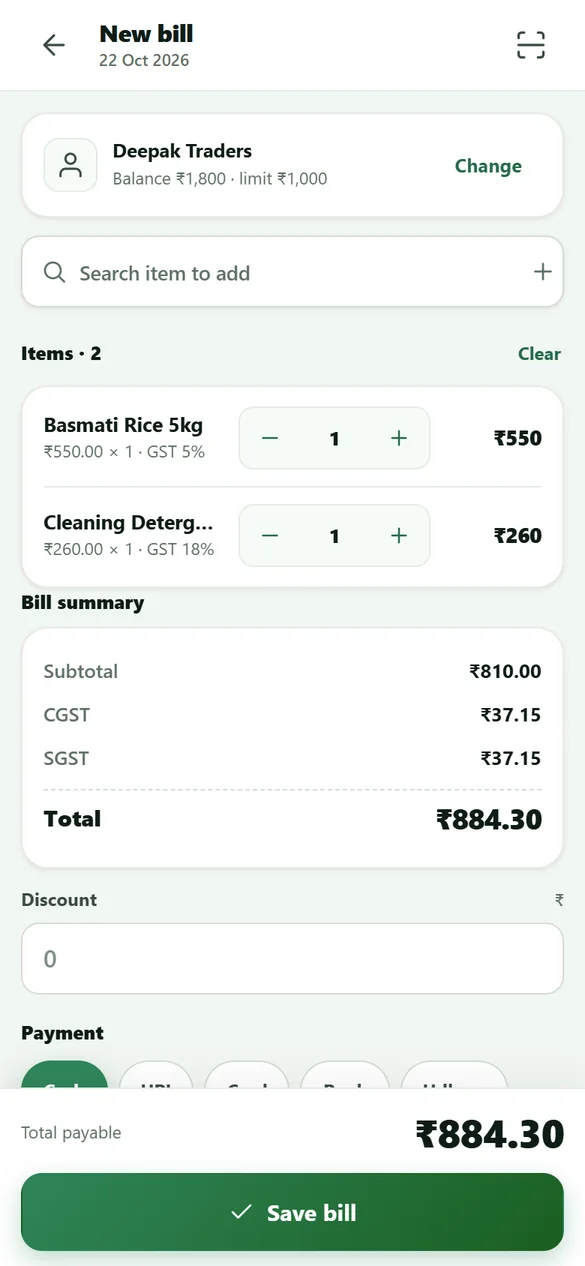
HisaabBox now has a mobile app for billing, stock and khata. It installs straight from the browser — no app store needed — and uses the same account as the website, so everything stays in one place.
- GST bills with CGST/SGST or IGST worked out per item, shared on WhatsApp or printed.
- Stock that moves with every bill and purchase, with batch and expiry tracking.
- Each customer's khata, with payments, reminders and a statement PDF.
- Barcode scanning with the phone camera, staff logins and dark mode.
07 Conclusion
Billing on the phone works when one bill does all three jobs: it records the sale, moves the stock and updates the khata. Check the basics before you switch, enter your opening stock and balances on day one, and keep a short closing routine. The phone then becomes the single place where your shop's numbers live.
08 Frequently Asked Questions
Can I make GST bills on my phone?
Do I need a computer if I use a mobile billing app?
Does the HisaabBox app work without internet?
How do I install the HisaabBox app?
Can my staff use the app?

Mohammad Ibrahim Wani
Mohammad Ibrahim Wani is the developer of HisaabBox, a business management platform focused on helping small businesses simplify inventory, billing, sales, and customer credit management.
View LinkedIn profile