Key Takeaways
Good inventory management helps you know what you have, what is selling, what to reorder, and where stock is being lost.
- Maintain an accurate product list.
- Track every stock movement.
- Set practical reorder levels.
- Separate fast and slow-moving products.
- Connect purchasing, billing, and inventory.
- Review stock regularly, not from memory.
Managing inventory is one of the most important day-to-day tasks for a small retail business. Whether you run a grocery store, hardware shop, electronics store, clothing shop, or another retail business, knowing what is in stock directly affects sales and cash flow.
Poor inventory management can lead to stock-outs, excess inventory, expired products, misplaced items, and difficulty understanding where money is tied up.
The good news is that inventory management does not have to be complicated. A consistent system for recording products, tracking stock movements, setting reorder levels, and reviewing inventory can make a significant difference.
01 What Is Inventory Management?
Inventory management is the process of recording, tracking, and controlling the products a business buys, stores, and sells. For a small retail business, this usually includes:
- Adding products and their basic information.
- Recording purchases and incoming stock.
- Recording sales and outgoing stock.
- Tracking current stock quantities.
- Identifying low-stock products.
- Managing suppliers.
- Checking stock regularly.
02 Why Inventory Management Matters
Inventory represents money invested in products. If it is not tracked properly, a business can lose money without immediately realizing where the problem is.
Reduce stock-outs
If an important product runs out, customers may purchase it elsewhere. Tracking stock levels helps you identify products that need to be reordered.
Avoid overstocking
Buying too much stock ties up working capital and increases the risk of products becoming outdated, damaged, or expired.
Understand what sells
Reviewing sales and inventory data helps identify products that sell quickly and products that stay on shelves for long periods.
Make better decisions
Accurate inventory records provide better information for purchasing, pricing, promotions, and business planning.
03 Keep a Clean Product List
A reliable inventory system starts with an accurate product list. Each product should have enough information to identify it clearly.
| Information | Example |
|---|---|
| Product Name | LED Bulb 9W |
| SKU / Product Code | LED9W001 |
| Category | Electrical |
| Purchase Price | ₹70 |
| Selling Price | ₹100 |
| Current Stock | 35 units |
| Reorder Level | 10 units |
Consistent product names and codes make products easier to find and reduce duplicate records.
Naming tipPick one format and stick to it, for example Brand + Product + Size. “Havells LED Bulb 9W” and “9W bulb Havells” should never exist as two separate records.
04 Track Stock Movements
Inventory changes whenever products enter or leave your business. Every significant stock movement should be recorded. Common movements include:
- Purchases from suppliers.
- Sales to customers.
- Customer returns.
- Damaged products.
- Expired products.
- Manual stock adjustments.
- Transfers between locations.
Without movement records, it becomes difficult to explain why the physical stock count differs from the recorded stock.
05 Set Reorder Levels
A reorder level is the stock quantity at which you should consider purchasing more of a product. If a product sells quickly and only 10 units remain, waiting until stock reaches zero could mean lost sales.
Reorder levels should reflect your sales speed, supplier lead time, and how important the product is to your business. A simple way to start:
Example: you sell 4 LED bulbs a day, the supplier takes 3 days to deliver, and you keep 3 extra as a buffer. Reorder level = (4 × 3) + 3 = 15 units.
Review them regularlySales speed changes with seasons, festivals, and pricing. A reorder level set six months ago may no longer be right.
06 Understand Fast and Slow-Moving Stock
Not every product deserves the same inventory strategy. Separating products by movement and risk helps you make better purchasing decisions.
Fast-moving
Sell frequently. Need regular replenishment and closer watching.
Slow-moving
Stay on shelves for long. Review before buying more quantity.
Risky
Can expire, go out of fashion, or need special storage.
A common approach is ABC analysis: “A” items are the few products that bring most of your revenue, “B” items are in the middle, and “C” items are many products that contribute little. Spend most of your attention on A items.
07 A Simple Real-World Example
Imagine a small hardware shop selling electrical items, plumbing products, tools, and paints.
The shop sells a particular LED bulb every day. If the owner only checks inventory once a week, the product may run out before the next stock check.
A better system tracks sales regularly, shows the remaining quantity, and indicates when the product reaches its reorder level. This simple change makes purchasing proactive instead of reactive.
08 Manage Your Suppliers
Your stock is only as reliable as the suppliers behind it. Keep a simple record for each one:
- Contact details and the products they supply.
- Typical delivery time (lead time).
- Price history, so you notice increases early.
- Payment terms and any amount you still owe.
- Notes on quality or delivery problems.
For important products, try to know at least one backup supplier so a single delay does not empty your shelf.
09 Connect Purchasing, Billing and Stock
Inventory works best when it is connected to the activities that change stock. When a purchase is recorded, stock should increase. When a sale is recorded, stock should decrease.
This creates a consistent relationship between purchasing, billing, and inventory records, and makes it easier to spot differences between expected stock and physical stock.
10 A Simple Routine to Get Started
- List all your products.Add name, code, category, prices and current quantity.
- Count what is on the shelf.Do one full physical count so your starting numbers are correct.
- Set reorder levels for your top products.Start with the 10 to 20 items that sell the most.
- Record every purchase and sale.Do it the same day, not at the end of the week.
- Count a few items every week.Compare the shelf with your records and fix differences.
11 Inventory Management Checklist
Tick items off as you go. Use it as a routine for your shop.
12 Common Inventory Mistakes
1. Relying only on memory
Business owners handle many tasks every day. Relying on memory makes it easy to forget purchases, sales, returns, or damaged stock.
2. Not recording stock adjustments
If physical stock changes but the record is not updated, the recorded quantity quickly becomes inaccurate.
3. Ignoring slow-moving products
Continuously purchasing products that are not selling ties up valuable working capital.
4. Checking stock too infrequently
Regular reviews help you find discrepancies and purchasing needs earlier.
13 Excel vs Inventory Software
Spreadsheets can work for a small number of products and simple operations. Maintaining inventory manually becomes harder as products, transactions, and customers increase.
Excel / Spreadsheet
- Manual data entry
- Can require frequent updates
- Easier for simple lists
- More manual checking
Inventory Software
- Structured business workflow
- Designed around business transactions
- Better suited to connected operations
- Can provide inventory visibility and reports
The right choice depends on the size and complexity of the business. A spreadsheet may be enough for a very simple operation, while dedicated software becomes useful as activity grows.
14 How HisaabBox Can Help
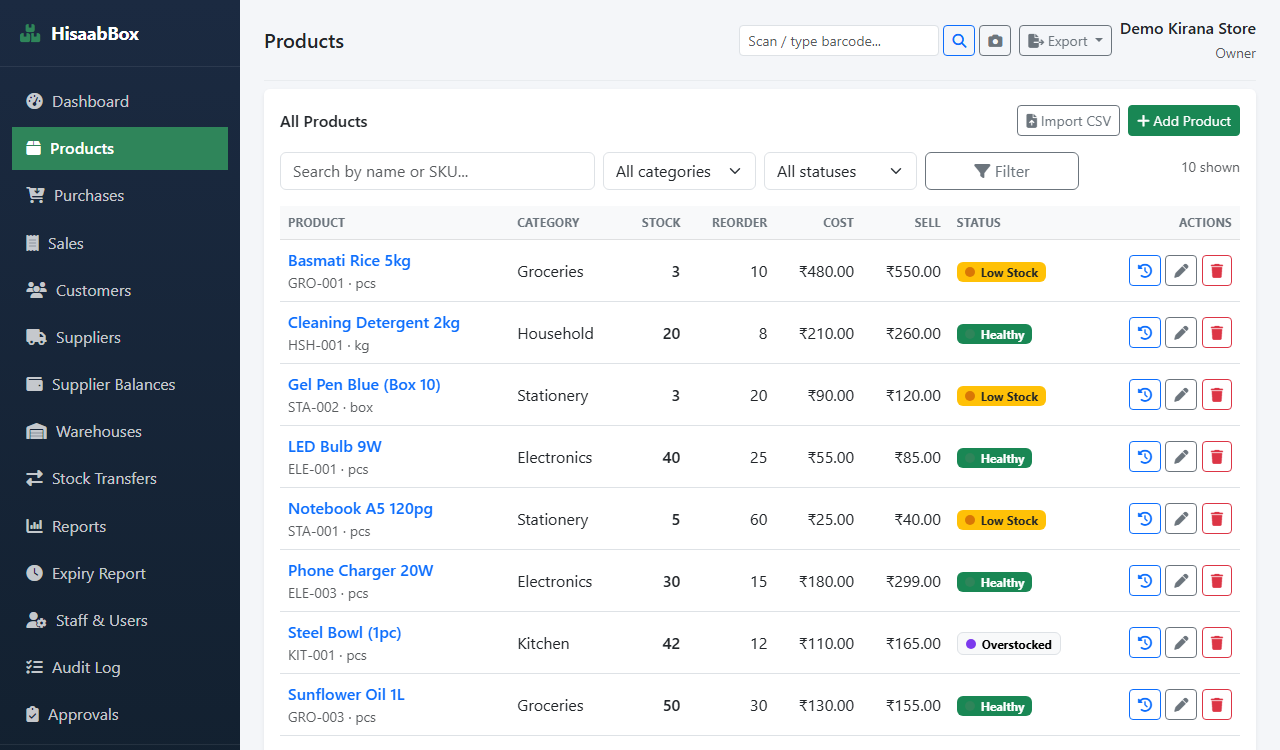
HisaabBox is designed to bring important day-to-day business activities into one place for small businesses and retailers. Depending on your workflow and the product's current features, this can include managing products and stock alongside billing, sales, purchases, suppliers, customers, and customer credit records.
The goal is to reduce the need to manage everyday business information across disconnected notebooks, spreadsheets, and tools.
Before you rely on a featureReview the current HisaabBox product functionality and check whether it fits your particular workflow.
“I built HisaabBox because I wanted to make everyday business management simpler for small businesses. Many shop owners still have to manage stock, billing, and customer credit across notebooks, spreadsheets, or different tools. This article is part of our effort to share practical knowledge that can help businesses build more organized workflows.” — Mohammad Ibrahim Wani, Developer of HisaabBox
15 Conclusion
Good inventory management does not require a complicated system. The most important step is creating a consistent process for recording stock, monitoring movement, setting reorder levels, and reviewing inventory.
As a retail business grows, connecting inventory with purchasing, billing, sales, and customer records can make daily operations easier to manage.
Simplify Your Business Management
Manage stock, billing, purchases, and customer records from one place with HisaabBox.
16 Frequently Asked Questions
What is inventory management?
Inventory management is the process of tracking and controlling the products a business purchases, stores, and sells.
How can a small retail business track inventory?
A business can track inventory using a spreadsheet or dedicated inventory management software. The important part is consistently recording purchases, sales, returns, adjustments, and current stock levels.
What is a reorder level?
A reorder level is the stock quantity at which a business should consider purchasing additional inventory.
Why is inventory management important for small businesses?
It helps businesses understand their stock position, reduce the risk of stock-outs, avoid unnecessary overstocking, and make better purchasing decisions.
Is Excel enough for inventory management?
Excel can be sufficient for simple inventory requirements. Dedicated inventory software can become more useful when a business has more products, transactions, customers, suppliers, or locations to manage.

Mohammad Ibrahim Wani
Mohammad Ibrahim Wani is the developer of HisaabBox, a business management platform focused on helping small businesses simplify inventory, billing, sales, and customer credit management.
View LinkedIn Profile